◆ Verification
Scanning the QR Code: What a Real Result Looks Like
· 6 min read
Counterfeiters can copy a box exactly. Printing quality, foil, holograms, even the feel of the card — all of it is reproducible, and the good fakes are genuinely hard to call by eye. What is much harder to fake is a code that has to resolve to a specific batch on a system they do not control, which is why this check is worth fifteen seconds before every purchase.
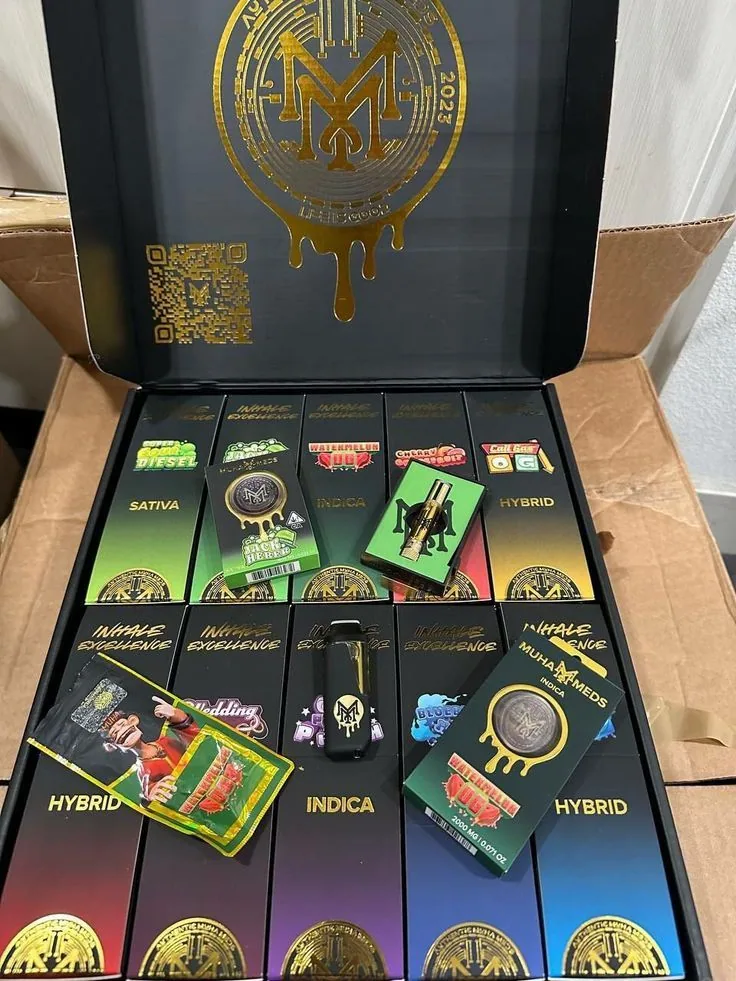
Where the code is, and how to scan it
- Find the code on the retail packaging, not on a sticker applied over something else. A label covering existing print is itself a warning.
- Use your phone camera. Every current phone reads QR codes from the standard camera app — you do not need a separate scanner, and you should be wary of any app a seller asks you to install.
- Note the batch code printed alongside it before you scan, so you can check the result matches.
- Read the page it opens. The result should name the batch, the product and the test date, and link to that batch's own certificate of analysis.
What a genuine result looks like
- It lands on our own domain, not a link-shortener and not a generic landing page.
- It names your specific batch — and that batch matches the code printed on the box in your hand.
- It links to the lab report for that batch, with a licensed lab named on it and a test date that precedes your purchase.
- The product shown is the product you are holding, down to the size and the line.
If the result is right, the COA is the next thing worth two minutes — the guide to reading one covers which panels actually matter.
The three ways it fails
| What happens | What it means |
|---|---|
| The code does not scan at all | Could be damaged print or a bad angle — try again in better light. If it still will not read, treat it as unverified. |
| It scans but the batch is not found | The code is not one of ours. This is the clearest counterfeit signal there is. |
| It opens something that is not a batch result | A shortener, a social page, a generic brand site or a PDF. Copying the look of verification without the substance of it is the most common trick. |
Frequently asked questions
- Where is the QR code on Muha Meds packaging?
- On the retail packaging itself, printed as part of it rather than on a sticker applied over the top. A label covering existing print is a warning sign in its own right.
- Do I need a special app to scan it?
- No. Any current phone camera reads QR codes natively. Be cautious of any seller who asks you to install a particular app to verify their product — that is a way of controlling what the result says.
- The code will not scan. Is it fake?
- Not necessarily — damaged print, glare or a bad angle all prevent a read. Try again in better light and at a different distance. If it genuinely will not resolve, treat the product as unverified, which is not the same as proven fake but is enough reason not to buy it.
- It scanned but says the batch was not found. What now?
- Do not buy it, or stop using it if you already have. A code that resolves to no batch is the clearest counterfeit signal available — the packaging was copied but the code behind it was not.
- It opened a page with the logo on it. Is that a pass?
- Only if that page names your specific batch and links to its lab report. A branded page with no batch number verifies nothing, and imitating the appearance of verification is one of the more common tricks.
- Should I scan before or after buying?
- Before, every time. The check is only worth anything while you can still decline the purchase.
Keep reading